How to Withdraw from EdgeGraph FX with Images – Easy Step-by-Step Guide [EdgeGraph FX LIMITED Official]
EdgeGraph FX is an overseas FX broker that has gained great popularity among FX traders.
It offers an excellent trading environment and a wide range of trading tools, but the withdrawal methods after making a profit are not widely known. Even if you make a profit from FX trading, it is meaningless if you cannot withdraw it.
So this time, we will explain in detail how to withdraw from EdgeGraph FX, with images to guide you through the process. We will cover not only the withdrawal steps, but also important notes and frequently asked questions, so FX traders who feel uncertain about withdrawing from EdgeGraph FX should use this as a reference.
Table of Contents
EdgeGraph FX Withdrawal Methods
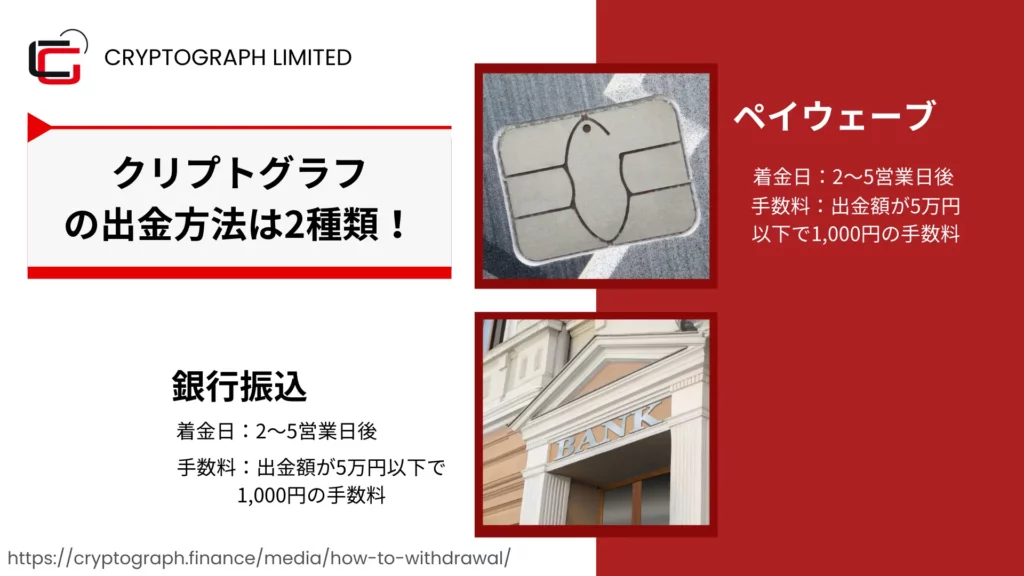
EdgeGraph FX only supports bank transfer withdrawals. (Updated August 2024)
EdgeGraph FX offers two withdrawal methods: bank transfer and PAYWAVE.
Please note that credit cards and electronic payment services are not supported. Also, all bank withdrawals are processed in Japanese yen. This means that even if you trade FX in a USD-denominated account, your account balance will be converted to yen at the time of withdrawal.
The number of withdrawal methods is fewer compared to other FX brokers, but having too many withdrawal options can pose the risk of giving users room for money laundering. When trading with EdgeGraph FX, as long as you register a bank account, you can withdraw at any time with just the click of a button, so there should be no particular issues.
About Withdrawals via PAY WAVE
A new withdrawal method, 'PAYWAVE,' was implemented in August 2024.
Information regarding the withdrawal method and overview for PAYWAVE is currently being prepared. Please wait a little longer.
As mentioned earlier, EdgeGraph FX offerstwo withdrawal methods: bank transfer and PAYWAVE.
Bank transfers can only be made in Japanese yen and to domestic financial institutions, but PAY WAVE allows foroverseas transfers and cryptocurrency transfersand more.
“What is PAY WAVE?
PAY WAVE is a unique Global E-Wallet service that combines blockchain-based cryptocurrencies, led by Bitcoin, with a debit card linked to a bank account. It enables sending and receiving Bitcoin, as well as sending and receiving legal tender.
It is a system that enables instant transfer processing through PAY WAVE.
PAY WAVE provides safe, fast, and convenient international money transfers. By using PAY WAVE, you can send money internationally to family, friends, and acquaintances abroad quickly and with low fees.
For example,
Hanako, who lives in Japan, wants to send money to her friend Mark, who lives in the United States.
Normally, the only way for Hanako to send money to Mark is through an international bank transfer. International transfer fees are high, and it takes at least 2 to 3 days for the money to arrive.
However, if Hanako and Mark both have PAY WAVE accounts, the transfer can be completed instantly.
What are the benefits of PAY WAVE?
PAY WAVE is a highly convenient global payment service for person-to-person transfers and online shopping.
When selling products targeting global users, payment methods for different national currencies are required, but by using PAY WAVE, payments in all currencies become possible.
The convenience of PAY WAVE stands out when exchanging to local currency during overseas travel.
By using the PAY WAVE card to withdraw cash at local ATMs, you can significantly save on currency exchange fees.
By using PAY WAVE internal transfers, you can send money in real time to family, friends, and acquaintances abroad, and the recipient can also receive it in real time.
Online store merchants that sell products overseas are experiencing high satisfaction with it as a payment method.
It is also widely used by individual users who are preparing for overseas travel or are concerned about the high fees of international money transfers.
In particular, it is equipped with cryptocurrency and exchange functions, providing unique payment capabilities to individuals and businesses that need to send, receive, and exchange cryptocurrencies, as well as deposit and withdraw in fiat (legal tender).
How do I apply for a PAY WAVE account?
You can open an account in just about 3 minutes with a very simple procedure.
What you will need
Government-issued identification
Passport, driver's license, ID card, etc.
https://paywave.world/about/
”
Features of Bank Transfer
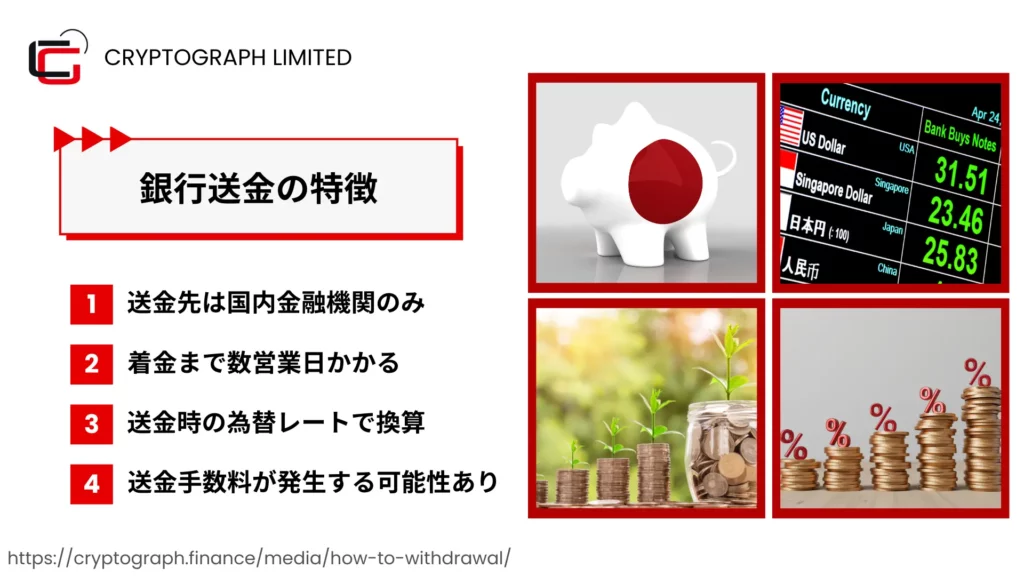
Bank transfer is a widely used remittance method worldwide, supported by many overseas FX brokers. EdgeGraph FX bank transfers have the following features.
- ✓Transfers are limited to financial institutions within Japan
- ✓It takes several business days for funds to arrive
- ✓Foreign currency is converted to yen at the exchange rate at the time of transfer
- ✓Transfer fees may apply
The only destinations that can be specified for transfers are financial institutions within Japan; overseas transfers are not supported.
Also, from the time a withdrawal request is submitted to the actual arrival of funds in the account, it typically takes 2 to 5 business days.
Another feature of bank transfers is that foreign currency is converted to yen at the exchange rate at the time of transfer. Depending on the rate, the amount you receive may be less than expected, so caution is advised.
Regarding transfer fees, a fee of 1,000 yen is charged if the withdrawal amount is less than 50,000 yen, and the fee is free if the withdrawal amount is 50,000 yen or more, so if you want to minimize fees, it is recommended to withdraw 50,000 yen or more.
Experience unrestricted trading with maximum leverage of 1000x and industry-leading low spreads!
Open an EdgeGraph FX account hereHow to Withdraw via Bank Transfer
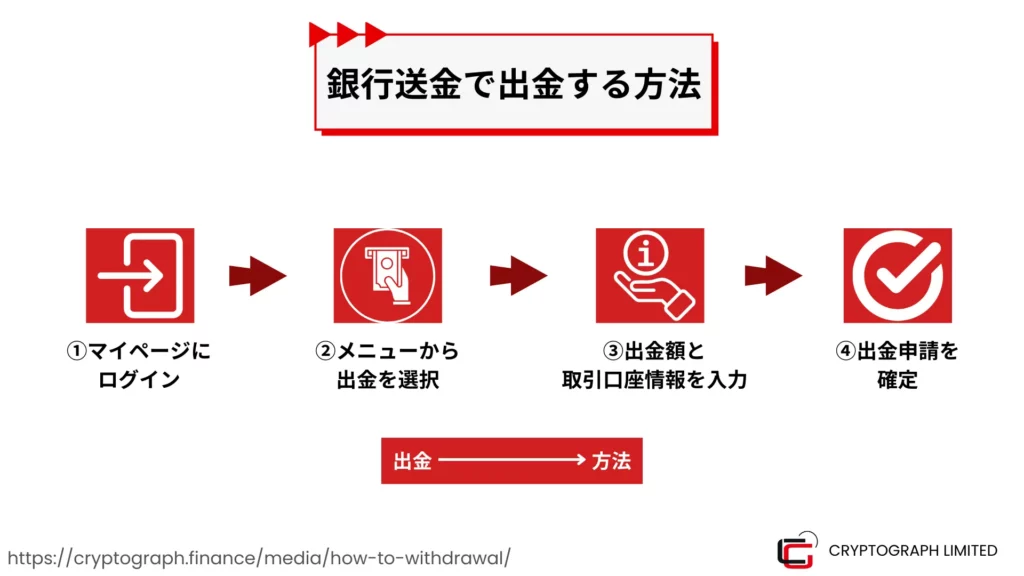
The process for withdrawing from EdgeGraph FX via bank transfer consists of the following 5 steps.
- Log in to My Page
- Select withdrawal from the menu
- Enter the withdrawal amount and recipient account information
- Confirm the withdrawal request
- Approve the withdrawal request confirmation email
Now let's look at each step in detail.
① Log in to My Page
First, log in to EdgeGraph FX's My Page. Access the official EdgeGraph FX website and click the "Login" button in the upper right corner of the screen.

Next, enter your registered email address and password, then click the "Login" button. If you have set up two-factor authentication, you will also need to enter the authentication code.
Once logged in, your My Page will be displayed. On My Page, you can check your account balance, transaction history, deposit and withdrawal history, and more.
② Select withdrawal from the menu
From the menu at the top of My Page, select "Withdraw".
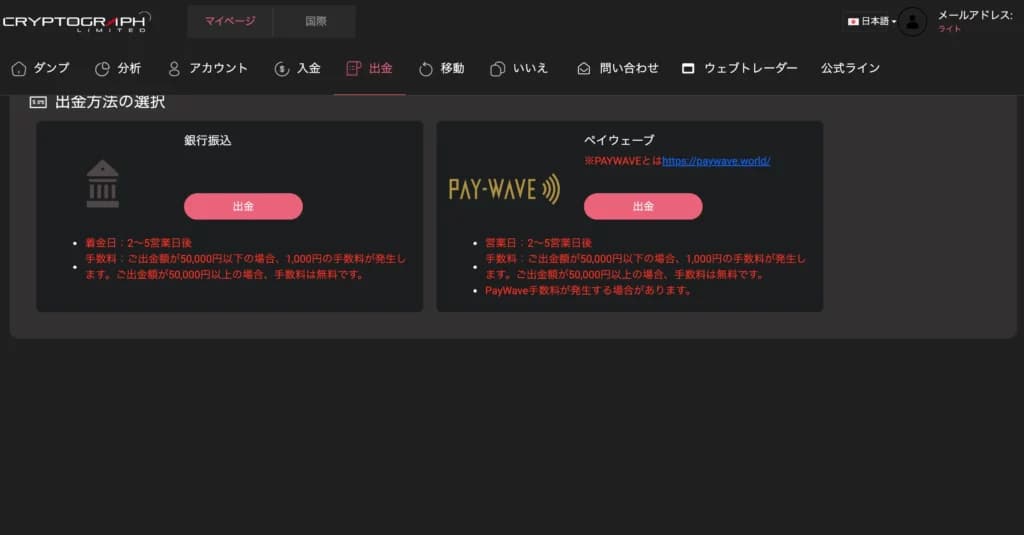
Click the withdrawal button located below the bank transfer option.
③ Enter the withdrawal amount and recipient account information
First-time withdrawers will need to register their account.
- Account number
- Bank name
- Branch name
- SWIFT code
- Account holder name
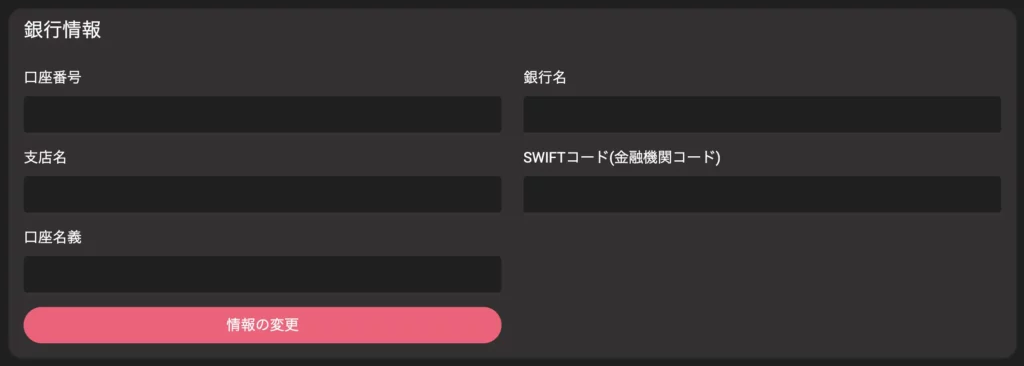
Enter the information carefully and complete the account registration.
※ Those who have not yet completed identity verification will not be able to withdraw, so please submit the required documents.
Once registered, your account information can be selected for future withdrawals.
④ Confirm the withdrawal request
Once the request is submitted, a withdrawal request acknowledgment email will be sent to your registered email address. Please keep it safe.
Once the withdrawal request is accepted, EdgeGraph FX will initiate the bank transfer procedure. The withdrawal is typically reflected in the specified account within approximately 2 to 5 business days.
Banks are closed on weekends and public holidays, so transfer procedures will not be carried out on those days. Additionally, funds may arrive later depending on the business days of the receiving bank or intermediary banks.
⑤ Approve the withdrawal request confirmation email
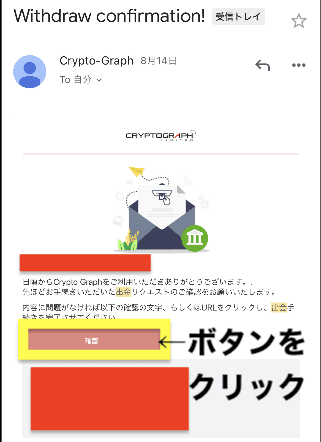
Once you approve the withdrawal request, you will receive a withdrawal confirmation email like the one below.
Press the approval button highlighted in the yellow box in the image to complete the withdrawal process.
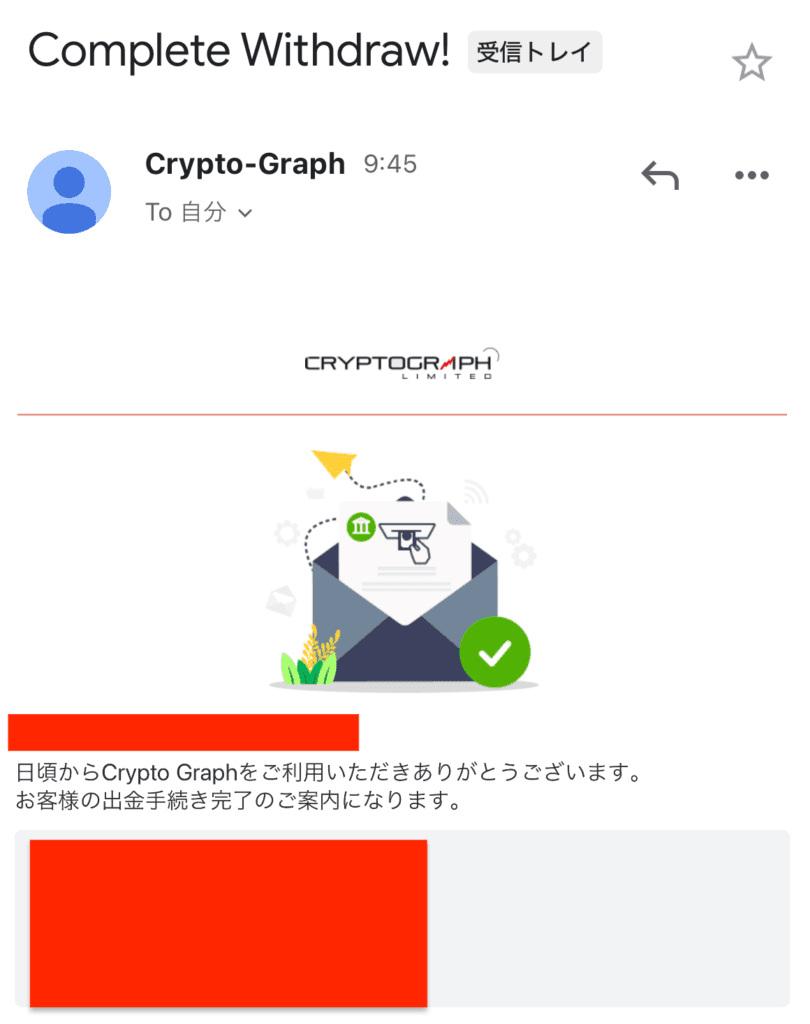
Once the withdrawal process is complete, you will receive a confirmation email like the one below. Please check it.
In summary, the process is as follows.
Log in to My Page
My Page is here. If you have not yet completed account registration, please register here.
Select withdrawal from the menu
Click the withdrawal button displayed in the sidebar or at the top of the screen
Enter the withdrawal amount and recipient account information
Please register your bank account. Since this is an international transaction, a SWIFT code will be required.
Confirm the withdrawal request
Funds will arrive within a few days after the withdrawal request is submitted. If funds have not arrived after more than one week, please contact customer support.
Confirm the withdrawal request
You will receive an approval email, so click the button in the email to finalize the withdrawal process.
Please note that withdrawal requests cannot be cancelled. If you have accidentally submitted a withdrawal request, please contact customer support immediately.
That concludes the withdrawal process for EdgeGraph FX. No document submission is required, and the process is very simple, but it is recommended to review the steps before making your first withdrawal.
Experience unrestricted trading with maximum leverage of 1000x and industry-leading low spreads!
Open an EdgeGraph FX account hereImportant Notes When Withdrawing from EdgeGraph FX
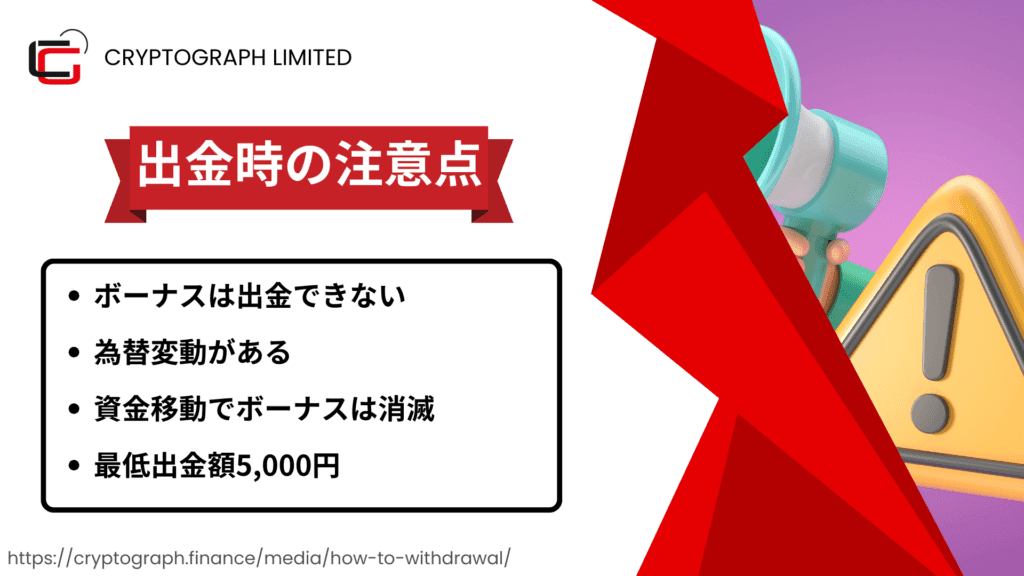
There are several important points to note when withdrawing from EdgeGraph FX.
To avoid withdrawal issues, please make sure you understand the following points.
Only profits can be withdrawn | Bonuses cannot be withdrawn
Withdrawals are in Japanese yen, so exchange rate fluctuations apply
Bonuses will be forfeited if funds are transferred between accounts
A fee of 1,000 yen applies for withdrawals under 50,000 yen
Only profits can be withdrawn | Bonuses cannot be withdrawn
With EdgeGraph FX, only the profits earned from FX trading using bonuses can be withdrawn; the bonus amount itself cannot be withdrawn.
For example, if you deposited 100,000 yen, received a bonus of 50,000 yen, and made a profit of 30,000 yen, the withdrawable amount would be 130,000 yen (deposit of 100,000 yen + profit of 30,000 yen). The 50,000 yen bonus is not eligible for withdrawal.
Only profits earned from FX trading using the bonus as capital can be withdrawn.
Withdrawals are in Japanese yen, so exchange rate fluctuations apply
All withdrawals from EdgeGraph FX are processed in Japanese yen. Therefore, if you are trading FX in a USD-denominated account, the calculation will be based on the exchange rate at the time of withdrawal.
Withdrawing when the yen is weak against the dollar can yield exchange rate gains, but during periods when the yen is strong against the dollar, there is a risk of incurring exchange rate losses.
Bonuses will be forfeited if funds are transferred between accounts
With EdgeGraph FX, if you transfer funds from the FX account that received a bonus to another account, the bonus will be forfeited.
If you want to fully use your bonus, trade without transferring funds.
A fee of 1,000 yen applies for withdrawals under 50,000 yen
If the withdrawal amount is less than 50,000 yen, a fee of 1,000 yen per transaction will be charged.
No fee is charged for 50,000 yen or more, so if you have the flexibility, it is recommended to let your profits accumulate to some extent before withdrawing.
※ In the case of cryptocurrency, no fees are charged.
Frequently Asked Questions About EdgeGraph FX Withdrawals
Finally, here are some frequently asked questions about withdrawals from EdgeGraph FX in Q&A format.
That concludes the main Q&A regarding withdrawals from EdgeGraph FX. If you have any other questions, we recommend contacting support.
EdgeGraph FX Withdrawal Methods Summary
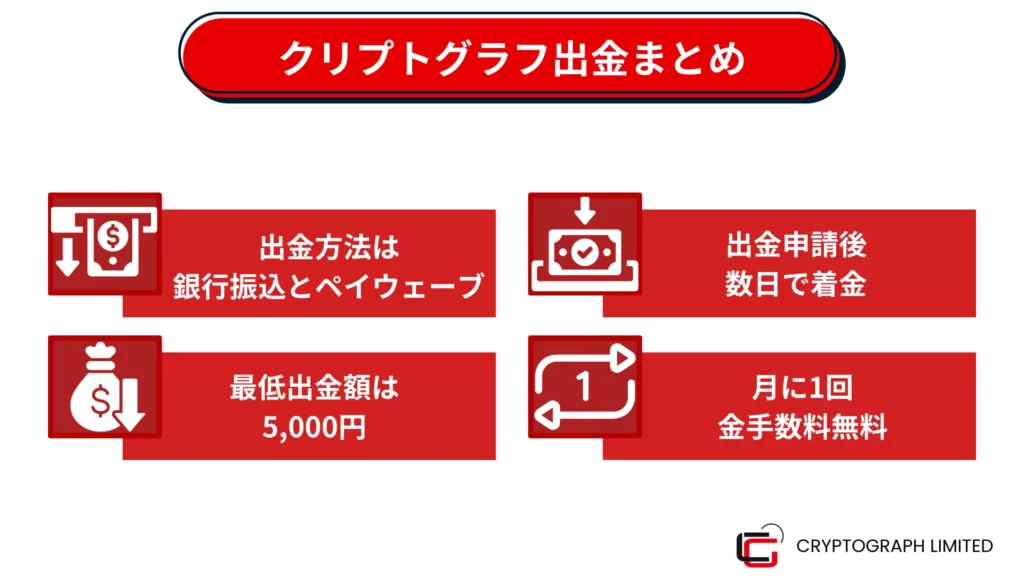
Withdrawals from EdgeGraph FX support bank transfer and PAYWAVE, and the withdrawal procedure itself is simple. However, there are several important points to note, such as the handling of bonuses and withdrawal fees.
FX trading can aim for high returns by using leverage, but it is also characterized by high risk. EdgeGraph FX offers a high maximum leverage and low spreads, providing a convenient environment from an FX trader's perspective.
If you have not yet opened an account, we recommend starting FX trading with EdgeGraph FX. With a constant 20% deposit bonus, both beginners and advanced traders can get off to a strong start.

![What is an FX Bonus? A Complete Guide to the Difference from Balance [EdgeGraph FX Beginner's Guide]](/_next/image?url=https%3A%2F%2Fhezwttxy7pl7mw4j.public.blob.vercel-storage.com%2F13-2-2.webp&w=3840&q=75)
![How to Start MT5 Trading with an EdgeGraph FX Demo Account [Complete Guide to Getting Started and Key Points]](/_next/image?url=https%3A%2F%2Fhezwttxy7pl7mw4j.public.blob.vercel-storage.com%2F12-2-2.webp&w=3840&q=75)
![What are EdgeGraph FX Spreads? A Complete Introduction to Spreads by Account Type [EdgeGraph FX LIMITED Official]](/_next/image?url=https%3A%2F%2Fhezwttxy7pl7mw4j.public.blob.vercel-storage.com%2F8-2.webp&w=3840&q=75)
![A Thorough Comparison of EdgeGraph FX's 3 Account Types, Their Differences, and Recommended Points [EdgeGraph FX LIMITED Official]](/_next/image?url=https%3A%2F%2Fhezwttxy7pl7mw4j.public.blob.vercel-storage.com%2F7-2.webp&w=3840&q=75)