How to Start MT5 Trading with an EdgeGraph FX Demo Account [Complete Guide to Getting Started and Key Points]
Many people are interested in FX trading but feel that "using their own money right away is scary." If that sounds like you, what you want to take advantage of is an overseas FX demo account.
EdgeGraph FX Limited offers free demo trading using the MT5 platform. In this article, we explain in detail how the EdgeGraph FX demo account works, exactly how to get started, and tips for making the most of it!
Table of Contents
- EdgeGraph FX Basics
- What Is the EdgeGraph FX Demo Account? How It Works
- 4 Benefits of the Demo Account
- How to Open a Demo Account — 5 Steps
- 3 Ways to Make the Most of Demo Trading
- Differences Between Demo Account and Real Account
- EdgeGraph FX Demo Account Main Specifications Summary
- Frequently Asked Questions (FAQ)
- Q. Is identity verification required to open a demo account?
- Q. What happens if I use up all the virtual funds in the demo account?
- Q. Can I transfer data from the demo account to a real account?
- Q. Are the spreads the same for demo and real accounts?
- Q. Can I demo trade on weekends?
- Q. What should I do if I don't know how to use MT5?
- Summary: Start by Experiencing Trading with a Demo Account
EdgeGraph FX Basics
EdgeGraph FX Limited is an overseas FX broker that provides FX trading services to traders around the world.
Key Features of EdgeGraph FX
Item / Details
| Item | Details |
|---|---|
| Company Name | EdgeGraph FX Limited |
| Trading Platform | MT5(MetaTrader 5) |
| Maximum Leverage | Up to 1000x |
| Trading Instruments | Foreign Exchange, Precious Metals, Energy, Index CFDs |
| Minimum Spread | From 0.0 pips |
What Is the EdgeGraph FX Demo Account? How It Works
The "demo account" offered by EdgeGraph FX is a free service that lets you experience trading with virtual funds using real market prices. You can learn the flow of FX trading without any risk using the full-featured MT5 platform.
Demo Account Basic Specifications
Item / Details
| Item | Details |
|---|---|
| Virtual Funds | $10,000 (approximately equivalent to 1,000,000 JPY) |
| Minimum Trade Size | 0.01 lots |
| Maximum Trade Size | 100 lots |
| Tradable Currency Pairs | 40+ types (including major pairs such as USD/JPY, EUR/JPY, GBP/JPY) |
| Platform | MT5 (compatible with Windows, Mac, and mobile) |
| Demo Period | 30 days (extendable) |
| Leverage | Up to 1000x |
| Spread | Same conditions as a real account |
※ The information in this article is current as of April 2026. Please check the official EdgeGraph FX website for the latest specifications.
With the demo account, you can experience trading using the same MT5 trading interface and real-time price data as a real account. Even if you run out of virtual funds, you can open a new demo account as many times as you like.
4 Benefits of the Demo Account
Benefit 1: Experience FX Trading Without Using Your Own Money
The greatest appeal of the EdgeGraph FX demo account is that you canexperience full-scale FX trading completely free of charge.
What you can experience with the demo account:
• Selecting currency pairs and setting trade volume
• Executing market orders, limit orders, and stop orders
• Holding and closing positions
• Chart analysis and use of technical indicators
• Setting stop-loss and take-profit levels
Since you are not using real funds, you can try various trading methods without fear of failure.
Benefit 2: Safely Experience Industry-Leading High Leverage
EdgeGraph FX offers ultra-high leverage of up to 1000x. With a demo account, you can safely experience this high-leverage trading.
Examples of leverage effects:
• With a margin of 10,000 JPY, you can trade up to the equivalent of 10,000,000 JPY
• Even small price movements can target large profits
• Learn through real experience that loss risk is also amplified at the same time
⚠️Important point:While high leverage expands profit opportunities, it also significantly increases the risk of losses. Practice proper risk management thoroughly with the demo account before moving on to real trading.
Benefit 3: Master the Professional-Grade MT5 Platform
MT5 (MetaTrader 5) used at EdgeGraph FX is a highly functional trading platform favored by professional traders around the world.
Key features available in MT5:
• Extensive technical indicators (80+ types)
• Advanced chart analysis functions
• Automated trading via Expert Advisors (EAs)
• Addition of custom indicators
• Simultaneous analysis across multiple timeframes
• Alert functions and push notifications
By getting comfortable with MT5 operations using the demo account, you will be able to start real trading smoothly.
Benefit 4: Practice Anytime — 24 Hours a Day on Weekdays
Since the FX market is open 24 hours a day on weekdays, you can practice with the demo account during the same hours.
Available trading sessions:
• Tokyo Session: 9:00–17:00 (Asian currencies are most active)
• London Session: 17:00–01:00 (European currencies are most active)
• New York Session: 22:00–06:00 (US Dollar is most active)
While observing the characteristics of each session through actual price movements, you can find the trading session that suits you best.
How to Open a Demo Account — 5 Steps
Opening an EdgeGraph FX demo account is very simple. Follow the steps below and start trading in about 5 minutes.
Step 1: Visit the EdgeGraph FX Official Website
Go to the EdgeGraph FX official website.
Step 2: Select "Open Demo Account"
• Click the "Open Account" button on the top page of the official website.
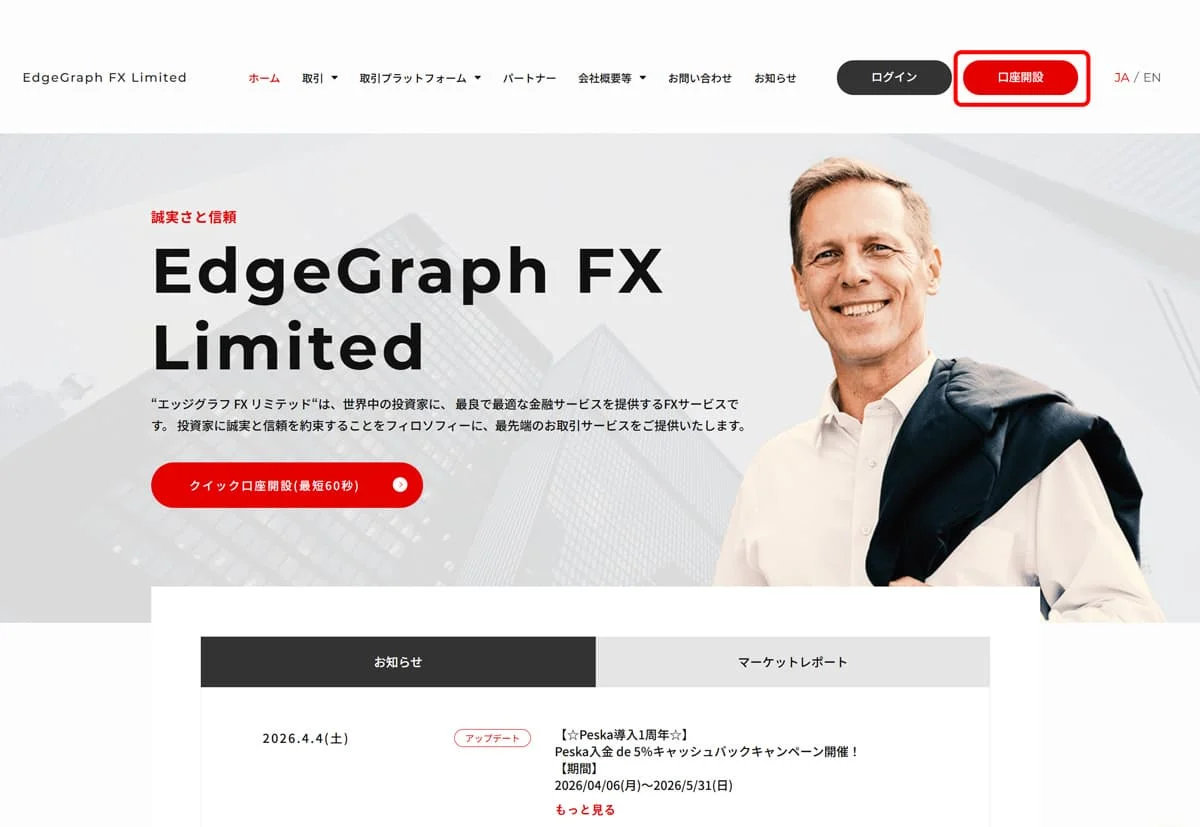
2. Click "Click here to open a demo account."
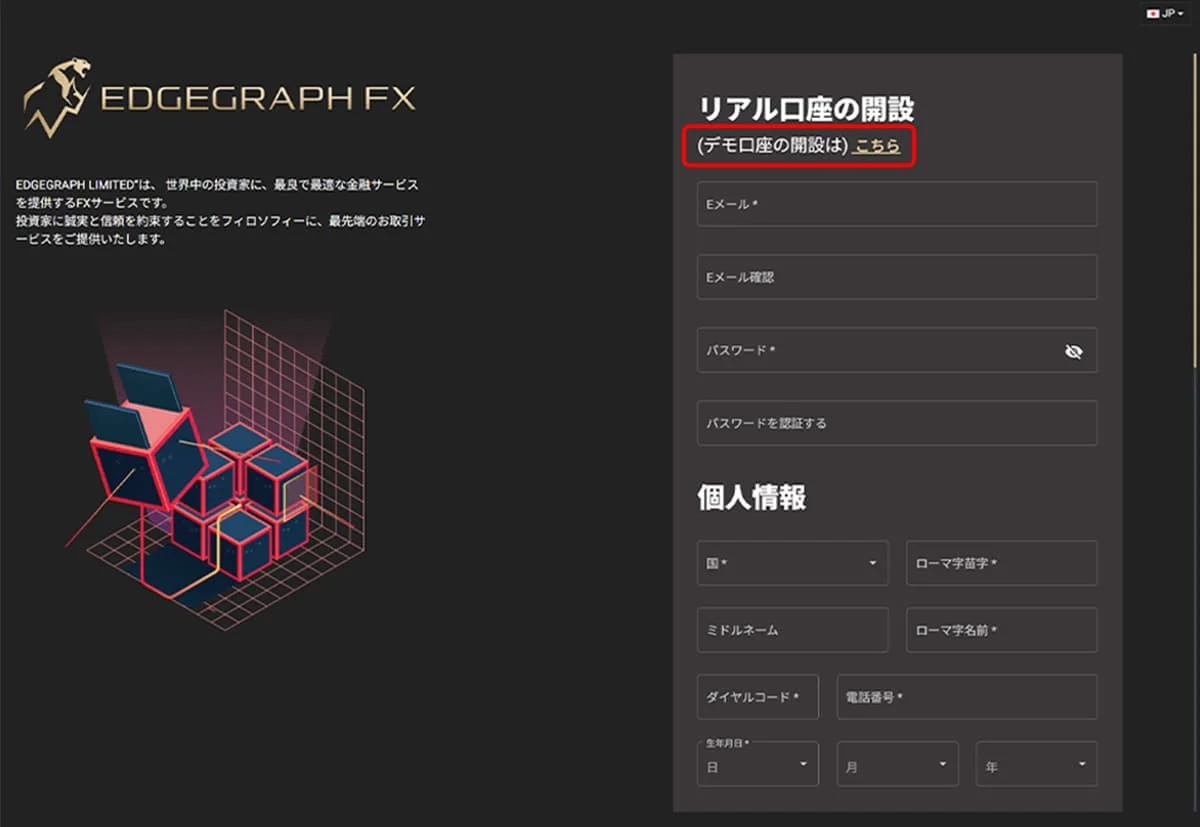
Step 3: Enter Your Basic Information
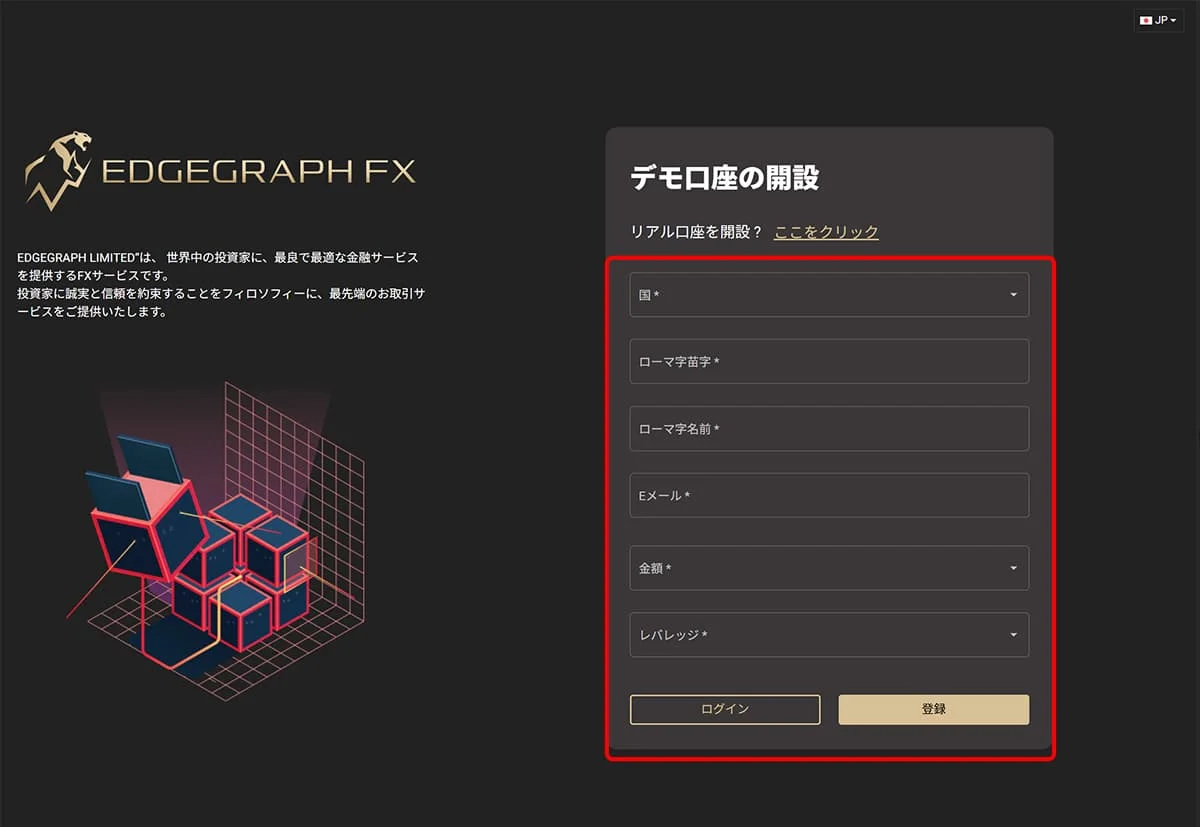
Enter the following information in the demo account opening form:
Required information:
• Name (in English)
• Email address
• Phone number
• Demo account settings (leverage, initial balance, etc.)
⚠️ Note:Even for a demo account, please enter accurate information. Your MT5 login details will be sent to you by email.
Step 4: Download the MT5 Platform
After completing the account opening, download the MT5 platform.
How to download:
• Click the link in the email sent from EdgeGraph FX
• Download the MT5 version suitable for your OS (compatible with Windows/Mac/iOS/Android)
• Run the installer
Step 5: Log In and Start Trading
Launch MT5 and log in to your demo account using the login credentials provided by EdgeGraph FX.
Login information:
• Server name
• Login ID
• Password
After logging in successfully, you can immediately start trading using your virtual funds.
3 Ways to Make the Most of Demo Trading
Method 1: Decide on a Trading Strategy and Test It
The demo account isan excellent opportunity to test various trading strategies.
Examples of strategy testing:
• Scalping: A method of accumulating small profits over short periods
• Day Trading: A method of closing positions within the same day
• Swing Trading: A method of holding positions for several days to several weeks
Record the win rate and profit/loss ratio for each method and find the strategy that works best for you.
Method 2: Practice with Multiple Currency Pairs
EdgeGraph FX allows trading with 40+ currency pairs.
Recommended currency pairs:
Category / Currency Pair / Characteristics
| Category | Currency Pair | Characteristics |
|---|---|---|
| Major Pairs | USD/JPY, EUR/JPY, GBP/JPY | High liquidity and narrow spreads |
| Cross Pairs | EUR/USD, GBP/USD, AUD/USD | Moderate volatility and easy to trade |
| Exotic Pairs | USD/TRY, USD/ZAR | Large price movements but also higher risk |
Try experiencing firsthand the price movement characteristics and spreads of each currency pair.
Method 3: Practice Risk Management Techniques
The most important thing in FX trading is proper risk management. Practice thoroughly with the demo account.
Basics of risk management:
• Position sizing: Keep the risk per trade within 1–2% of account balance
• Stop-loss setting: Always decide your stop-loss level in advance
• Take-profit target: Set a risk-reward ratio (ratio of profit to loss amount)
• Leverage management: Get gradually comfortable before using high leverage
Practice examples:
• With virtual funds of 100,000 JPY, set the risk per trade to 1,000–2,000 JPY
• Trade with a 2:1 risk-reward ratio, such as stop-loss at 20 pips and take-profit at 40 pips
• Experience the psychological state during a losing streak and how to cope with it
Differences Between Demo Account and Real Account
After practicing with the demo account, there are important points to be aware of when transitioning to a real account.
Item / Demo Account / Real Account
| Item | Demo Account | Real Account |
|---|---|---|
| Psychological Pressure | None | High pressure due to real funds |
| Order Execution Speed | Instant | Possible delays depending on market conditions |
| Slippage | Does not occur | May occur during sudden market moves |
| Awareness of Money Management | Tends to be less serious | Must be approached seriously |
| Trading Fees | Free | Spreads and commissions actually apply |
Points to Note When Using a Demo Account
• Don't be overly optimistic: Just because you were successful in demo trading doesn't mean you will get the same results in real trading
• Practice money management seriously: Develop the habit of managing funds carefully in the demo account, just as you would with real money
• Limits of emotional control: The pressure of trading with real funds cannot be experienced in a demo account
• Changing market conditions: The market environment during the demo period may differ from when you start real trading
EdgeGraph FX Demo Account Main Specifications Summary
Item / Details
| Item | Details |
|---|---|
| Account Type | Demo version of Standard Account |
| Initial Virtual Balance | $10,000 |
| Leverage | Up to 1000x |
| Spread | USD/JPY from 0.1 pips |
| Trading Fee | Free |
| Minimum Trade Size | 0.01 lots |
| Maximum Trade Size | 100 lots |
| Trading Platform | MT5 |
| Supported Devices | Windows, Mac, iOS, Android |
| Demo Period | 30 days (extendable) |
| Support | Japanese language support available |
Frequently Asked Questions (FAQ)
Q. Is identity verification required to open a demo account?
A.No, submission of identity verification documents is not required to open a demo account. You can open one instantly by simply entering basic information.
Q. What happens if I use up all the virtual funds in the demo account?
A.You can open a new demo account as many times as you like for free. Alternatively, you can contact customer support to reset your balance.
Q. Can I transfer data from the demo account to a real account?
A.Trade history and settings from the demo account cannot be transferred to a real account. However, chart settings and indicators created in MT5 can be carried over.
Q. Are the spreads the same for demo and real accounts?
A.Basically, they are set to the same conditions, but the spread on the real account may widen depending on market conditions.
Q. Can I demo trade on weekends?
A.Since the FX market is closed on weekends, demo trading is also unavailable on weekends. However, you can still practice chart analysis and order setup.
Q. What should I do if I don't know how to use MT5?
A.EdgeGraph FX provides Japanese language support. There are also plenty of official MT5 manuals and tutorial videos available.
Summary: Start by Experiencing Trading with a Demo Account
The EdgeGraph FX demo account is an important preparation step before starting FX trading. To summarize the key points covered in this article:
Key Points of the EdgeGraph FX Demo Account:
✅ Free and Easy to Open:Full trading environment available in about 5 minutes ✅ Advanced MT5:Practical training on a professional-grade platform ✅ High Leverage Experience:Safely experience leverage of up to 1000x ✅ Wide Range of Currency Pairs:Test various strategies with 40+ currency pairs ✅ Realistic Environment:Practice trading with real market prices and spreads
Skills to develop using the demo account:
• Mastering basic operations: How to operate the MT5 platform
• Establishing a strategy: Discovering the trading method that suits you
• Risk management: Proper money management and position sizing
• Psychological preparation: Mental readiness for losses and emotional control
Next Steps:Once you are sufficiently comfortable with demo account practice, try starting real trading with a small amount. It is the safest approach to start with a small lot size and gradually scale up your trading volume.

![What is an FX Bonus? A Complete Guide to the Difference from Balance [EdgeGraph FX Beginner's Guide]](/_next/image?url=https%3A%2F%2Fhezwttxy7pl7mw4j.public.blob.vercel-storage.com%2F13-2-2.webp&w=3840&q=75)
![What are EdgeGraph FX Spreads? A Complete Introduction to Spreads by Account Type [EdgeGraph FX LIMITED Official]](/_next/image?url=https%3A%2F%2Fhezwttxy7pl7mw4j.public.blob.vercel-storage.com%2F8-2.webp&w=3840&q=75)
![A Thorough Comparison of EdgeGraph FX's 3 Account Types, Their Differences, and Recommended Points [EdgeGraph FX LIMITED Official]](/_next/image?url=https%3A%2F%2Fhezwttxy7pl7mw4j.public.blob.vercel-storage.com%2F7-2.webp&w=3840&q=75)